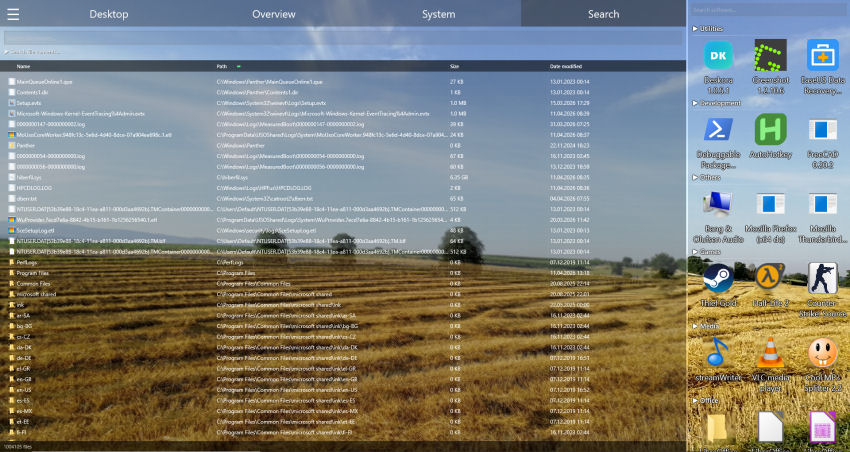
Why your documents stay invisible
The text of a PDF is not stored as plain text. It sits in compressed content streams, encoded per font. Office files since 2007 are ZIP containers holding compressed XML. A search that reads the raw bytes of those files finds precisely nothing — which is why so many people are convinced their document "is not on this computer" when it has been there all along.
- PDF — text lives in FlateDecode-compressed content streams
- DOCX, XLSX, PPTX — ZIP containers with compressed XML inside
- ODT, ODS, ODP — same principle, different XML
- Windows Search — indexes selected folders only, and skips most drives entirely
📄 Find the document, not just the file name
Deskora searches inside PDF, Word, Excel, PowerPoint and OpenDocument files — on every local drive.
Download Deskora for freeWhich formats are searched
Deskora extracts the readable text of a document and searches that. Below is exactly what it covers — and what it deliberately does not.
| Format | What is searched |
|---|---|
| PDF (.pdf) | Full page text, including compressed streams and CID fonts. Page number is reported. |
| Word (.docx, .docm) | Body text, tables, headers, footers, footnotes. Tracked deletions are excluded. |
| Excel (.xlsx, .xlsm) | All cells of all sheets, shared strings and inline text. Sheet name is reported. |
| PowerPoint (.pptx, .ppsx) | All slide text in slide order. Slide number is reported. |
| OpenDocument (.odt) | Full body text including headings and tables. |
| OpenDocument (.ods) | All cells of all tables. Table name is reported. |
| OpenDocument (.odp) | All slide text. Slide name is reported. |
| RTF (.rtf) | Full text, with control words and character codes resolved. |
| TXT, LOG, CSV, XML, JSON | Searched directly, byte for byte — the fast path, unchanged. |
| .doc, .xls, .msg | Not supported. The old binary formats and mail containers are a separate problem and are deliberately left out rather than half-done. |
How it works
The extraction is expensive, so it happens once. After that the text sits in a compressed index and every further search feels like searching plain text.
🔍 Text extraction
PDF content streams are decompressed and decoded through the font tables; Office files are unpacked and their XML is parsed properly — entities and paragraph breaks included.
💾 Persistent index
The extracted text is cached and compressed. It is rebuilt for a file only when its size or timestamp changes.
🌙 Quiet background build
Lowest thread and I/O priority, cancellable at any moment. You are not supposed to notice it.
📄 Real hit locations
A hit reports page 7, sheet "Revenue" or slide 3 — not a meaningless line number.
Deskora compared
Honest comparison. Deskora is free desktop software, not a legal e-discovery platform — and it does not pretend to be one.
| Deskora | Windows Search | Agent Ransack | dtSearch | |
|---|---|---|---|---|
| Searches inside PDF | Yes | Indexed folders only | Yes | Yes |
| Searches inside Office files | Yes | Indexed folders only | Yes | Yes |
| Covers every local drive | Yes | No | Yes | Yes |
| Regular expressions | Yes | No | Yes | Yes |
| Reports page / sheet / slide | Yes | No | No | Yes |
| Price | Free | Included | Free / paid | From several hundred euros |
Who this is for
⚖️ Law and tax practices
A file number appears in the header of a PDF, in the third sheet of a spreadsheet and in a scanned-and-OCRed contract. Searching by file name finds none of them. Searching by content finds all three, and tells you which page to open.
🔬 Research and study
Hundreds of papers, dozens of datasets, notes across three formats. "Which paper mentioned that method?" is a content question, and it should take a second, not an afternoon.
🔧 Technical documentation
Part numbers and error codes live inside manuals, not in their file names. A search that reads inside the manual turns a folder of PDFs into a knowledge base.
Your documents stay on your computer
The text extraction runs entirely on your machine. Nothing is uploaded, nothing is sent to a server, no account is required. You can switch the document index off completely, restrict it to selected folders, or exclude folders from it — because a program that indexes every local drive has to let you draw the line.
Frequently asked questions
Does it find text in scanned PDFs?
No. A scanned PDF is a picture of text, not text. Extracting it would require optical character recognition, which is a different kind of program. Deskora will simply report no match rather than pretend.
What about password-protected files?
They are skipped. Deskora does not attempt to break encryption, not even the common case of an empty user password — that lock was set on purpose by whoever created the file.
Will it slow down my computer?
The index is built in the background at the lowest thread and I/O priority, and it can be cancelled at any moment. Plain-text search is unaffected: it still runs directly on the file, without a copy.
How much disk space does the index need?
The extracted text is stored compressed and is a small fraction of the documents themselves. A few thousand documents typically cost a few dozen megabytes.
Does it work with non-English text?
Yes. Chinese, Japanese, Cyrillic, Arabic and Devanagari are handled, and case-insensitive matching works beyond ASCII — "МОСКВА" finds "Москва", and "STRASSE" finds "Straße".
Can I use regular expressions?
Yes, with ECMAScript syntax. An invalid expression shows a hint next to the field instead of failing silently.
📄 Find the document, not just the file name
Deskora searches inside PDF, Word, Excel, PowerPoint and OpenDocument files — on every local drive.
Download Deskora for free