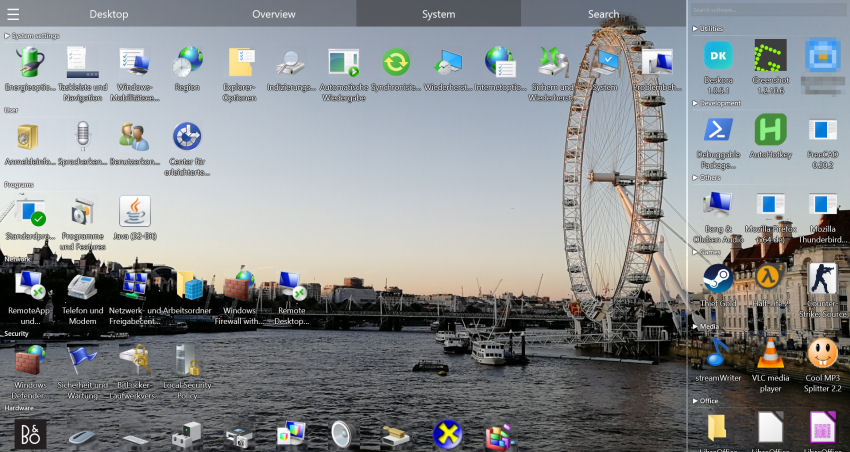
How Deskora Quick Search works
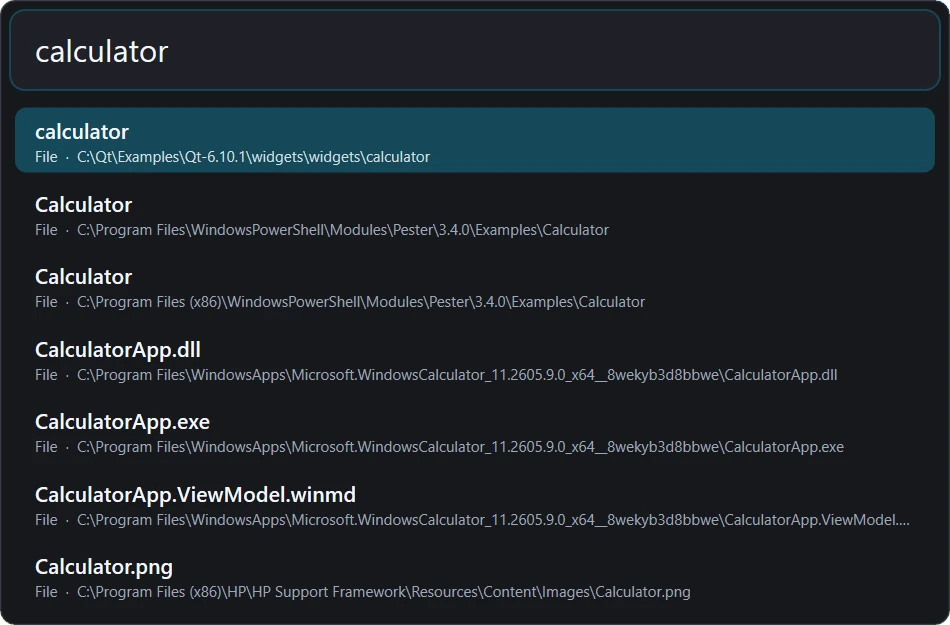
Windows search often pulls attention away from the current task. A start menu, an Explorer window and a separate content-search tool create three different workflows. Quick Search provides one keyboard-first surface, remains local, and opens the chosen item immediately.
Useful for opening a daily application, locating a project folder, revealing a download, finding a phrase inside a supported document, or reaching Documents and This PC while another application covers the desktop.
Searching Windows without extra software – and where it stops
The quickest built-in route is the Start menu: press the Windows key or Win+S, type part of a name and Windows lists apps, settings and documents, often mixed with web suggestions. For installed programs this works well. For files it depends on whether the folder is covered by the Windows Search index; anything outside the indexed locations shows up late or not at all.
In File Explorer, open the folder that probably contains the file and type into the search box at the top right – Ctrl+E or Ctrl+F jumps there. Explorer searches the current folder and all subfolders. Wildcards such as *.pdf and filters like kind:document, size:>100MB or datemodified:this week narrow the list. In folders that are not indexed, Explorer reads the directories one by one, which can take minutes on a large drive.
Which folders Windows indexes is set under Settings → Privacy & security → Searching Windows (Windows 10: Settings → Search → Searching Windows). “Classic” covers libraries and the desktop, “Enhanced” the whole PC. Control Panel → Indexing Options lets you add locations, decide which file types are indexed by content, and rebuild a damaged index via Advanced → Rebuild – a process that can run for hours in the background.
For targets you already know, Win+R opens the Run dialog: shell:downloads, shell:startup, %appdata% or a program name such as notepad open directly. The limits show up in everyday work: Start search mixes in web results unless that is turned off, Explorer is slow outside the index, and content search only covers the folders and file types Windows has indexed. Each tool handles one part of the job, and you switch between them.
Practical uses
Useful for opening a daily application, locating a project folder, revealing a download, finding a phrase inside a supported document, or reaching Documents and This PC while another application covers the desktop.
Download Deskora freeKeyboard reference
- Open the overlay, type a few characters, move with the arrow keys and confirm with Enter. Use > for programs, f for names, c for document contents and ? for help. Shift+Enter reveals a file in Explorer; Ctrl+Enter requests an elevated launch.
- Exact names rank above prefixes, substrings and fuzzy token matches. Program launches, accumulated runtime and recent use add bounded bonuses. Repeated choices for the same query are learned locally, so the order becomes personal without uploading history.
- Queries run on a background worker and superseded work is cancelled. Fast in-memory program and system-place matches arrive before the broader index pass. The overlay shares Deskora’s D3D11 device, owns only its window resources, supports per-monitor DPI and closes without an idle timer.
Getting started: practical tips
- After installation, Win+Space opens the search on the monitor where your mouse pointer is. Over a full-screen game or video the shortcut is ignored, so it never interrupts playback. If you prefer another shortcut, pick Win, Ctrl, Alt, Ctrl+Alt, Ctrl+Shift or Alt+Shift together with Space, a letter or F1–F12 on the Quick Search tab of the settings.
- Prefixes narrow the list: “> ” shows programs only, “f ” files and folders, “c ” text inside documents and “? ” a short help. Tab cycles through the prefixes, so you do not have to type them.
- Everything works from the keyboard: the arrow keys or the mouse wheel move the selection, Enter opens it and Esc closes the window. Clicking into another window closes the search as well.
- Shift+Enter shows the selected file highlighted in File Explorer – handy for downloads and attachments. The context-menu key or a right-click opens the normal Windows context menu for the result.
- Ctrl+Enter starts a program as administrator; Windows asks for confirmation with the usual UAC prompt.
- Names accept wildcards such as *.pdf or invoice*2025*. In the settings you can hide programs, files or folders and choose how many results appear, from 3 to 50 (default 7).
Usage-aware ranking
Exact names rank above prefixes, substrings and fuzzy token matches. Program launches, accumulated runtime and recent use add bounded bonuses. Repeated choices for the same query are learned locally, so the order becomes personal without uploading history.
Queries run on a background worker and superseded work is cancelled. Fast in-memory program and system-place matches arrive before the broader index pass. The overlay shares Deskora’s D3D11 device, owns only its window resources, supports per-monitor DPI and closes without an idle timer.
Practical uses
Programs, files and folders
Useful for opening a daily application, locating a project folder, revealing a download, finding a phrase inside a supported document, or reaching Documents and This PC while another application covers the desktop.
Document-content search
Open the overlay, type a few characters, move with the arrow keys and confirm with Enter. Use > for programs, f for names, c for document contents and ? for help. Shift+Enter reveals a file in Explorer; Ctrl+Enter requests an elevated launch.
Local learning
Exact names rank above prefixes, substrings and fuzzy token matches. Program launches, accumulated runtime and recent use add bounded bonuses. Repeated choices for the same query are learned locally, so the order becomes personal without uploading history.
History
Queries run on a background worker and superseded work is cancelled. Fast in-memory program and system-place matches arrive before the broader index pass. The overlay shares Deskora’s D3D11 device, owns only its window resources, supports per-monitor DPI and closes without an idle timer.
Comparison with other launchers
Everything is exceptionally focused on file names, Listary integrates strongly with file dialogs, and PowerToys Run is an extensible launcher. Deskora is distinctive when one local list should combine installed programs, NTFS files, folders, desktop entries and optional document-content results.
| Feature | Deskora | Everything | Listary | PowerToys Run |
|---|---|---|---|---|
| Programs, files and folders | Programs, files and folders | Files | Files | Programs, files and folders |
| Usage-aware ranking | Local learning | History | History | Plugin |
| Document-content search | Optional | Files | Optional | Plugin |
Keyboard reference
| Key | Action |
|---|---|
| Win+Space | Press Win+Space above any window and search programs, files, folders and Windows locations without interrupting your work. Deskora combines its local NTFS index with application usage data and presents the most useful matches first. |
| ↑ / ↓ | Action |
| Enter | Open the overlay, type a few characters, move with the arrow keys and confirm with Enter. Use > for programs, f for names, c for document contents and ? for help. Shift+Enter reveals a file in Explorer; Ctrl+Enter requests an elevated launch. |
| Shift+Enter | Files |
| Ctrl+Enter | Programs, files and folders |
| Tab | Document-content search |
How Deskora Quick Search works
Queries run on a background worker and superseded work is cancelled. Fast in-memory program and system-place matches arrive before the broader index pass. The overlay shares Deskora’s D3D11 device, owns only its window resources, supports per-monitor DPI and closes without an idle timer.
Exact names rank above prefixes, substrings and fuzzy token matches. Program launches, accumulated runtime and recent use add bounded bonuses. Repeated choices for the same query are learned locally, so the order becomes personal without uploading history.
Everything is exceptionally focused on file names, Listary integrates strongly with file dialogs, and PowerToys Run is an extensible launcher. Deskora is distinctive when one local list should combine installed programs, NTFS files, folders, desktop entries and optional document-content results.
What stays on your PC
Quick Search sends no queries anywhere. File and folder names come from Deskora’s own NTFS index, which is kept as a cache in the ProgramData folder on your computer; document contents are read straight from the files when you use the c prefix. Only local hard drives and SSDs are indexed.
There is no separate search history. Deskora only remembers a pair of search term and result when you actually open that result, and counts how often it happened. These counters are stored with the other Deskora settings in your Windows user account, program usage figures such as launches and runtime are recorded locally as well, and both are used for one thing only: putting the result you most likely want at the top.
Frequently asked questions
Does Quick Search send my queries to a server?
No. Matching, ranking and learning all happen on your PC. The learned counters are saved together with Deskora’s other settings in your Windows user account and never leave the computer.
Win+Space normally switches the keyboard layout. What happens to that?
While Quick Search is enabled, Deskora takes over Win+Space. If you switch input languages often, use the Windows alternative Alt+Shift, or give Quick Search a different shortcut on the Quick Search tab of the settings. If a shortcut cannot be registered because another program already owns it, the settings page shows a notice so you can pick another one.
Why does a file I know exists not show up?
Deskora indexes local hard drives and SSDs; network drives are not included. Also check whether files or folders are switched off in the Quick Search settings and whether a prefix such as > is still at the start of the search field. On PCs where the background service cannot run, folders are scanned instead and the index is not updated live, so very new files can appear with a delay.
Can the c prefix find text in scanned PDFs?
No. The content search reads text from PDF, Word, Excel, PowerPoint and OpenDocument files as well as plain text, CSV and source code. Scanned PDFs that contain only images without a text layer are skipped. Because the documents themselves are opened and read, a content search takes noticeably longer than a search by name.
Practical uses
Useful for opening a daily application, locating a project folder, revealing a download, finding a phrase inside a supported document, or reaching Documents and This PC while another application covers the desktop.
Download Deskora free